

VISION DATA ANALYZER SOFTWARE
Data analysis software for viewing and analyzing high-speed recorded data, including ASAM MDF files
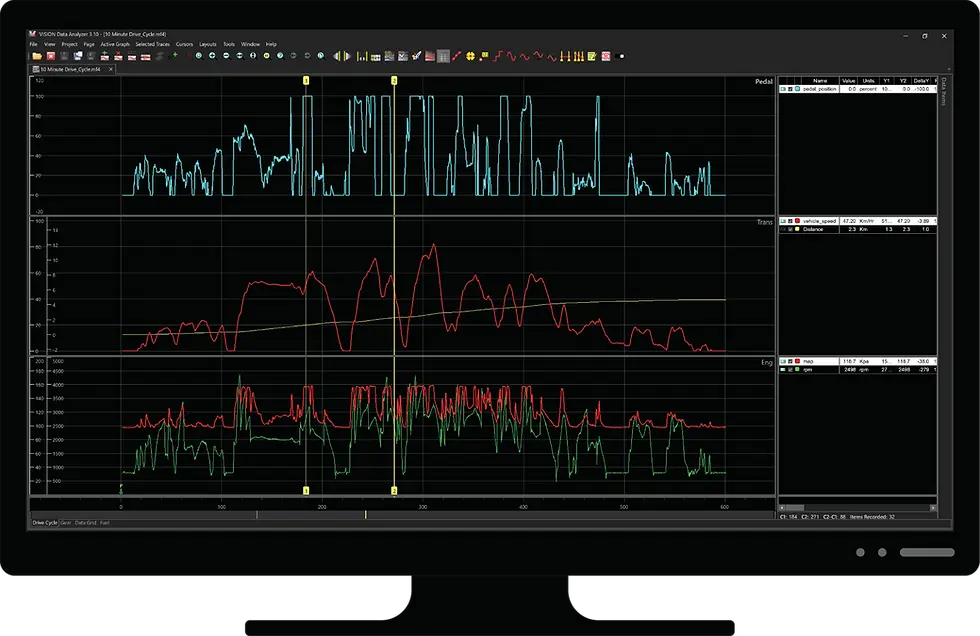
VISION Data Analyzer (VDA) is a 64-bit Windows software application for viewing, analyzing, comparing, and sharing measurement data in the industry-standard ASAM MDF4 format. VDA is built for engineers working with large, complex recordings that require fast navigation, flexible visualization, and reliable post-processing.
VDA can be used as a standalone MDF4 analysis tool and also fits naturally into the ATI VISION software ecosystem for teams that record, manage, and analyze data across ATI workflows.

Icon Caption
At a Glance
File Format
Native support for ASAM MDF4 files, including MDF4 data from ATI and third-party sources
Application Type
64-bit Windows software application designed for large measurement datasets
Large File Handling
Loads only the channels required for analysis to reduce memory usage when working with large MDF4 datasets
Visualization
Flexible layouts with trace plots, data grids, GPS views, dashboard pages, and configurable graphs
Multi-Recording Analysis
Open, overlay, and compare multiple recordings within a shared analysis workspace
Vehicle Data Support
View CAN and LIN trace data alongside signal traces in the same environment
GPS Visualization
Display GPS data, synchronize it with signal data, and export GPS information to KML
Calculated Channels
Create derived signals using formulas and C# scripting, with calculated results preserved in exports
Project Sharing
Save overlay configurations as VDAP project files and package sessions for sharing
Engineering teams are recording more data, from more sources, with more signals than ever before. Traditional analysis tools can struggle with high channel counts, large MDF4 files, and workflows that require signal data, vehicle network data, GPS data, and calculated results to be reviewed together.
Users can open large recordings, visualize only the signals they need, overlay multiple test runs, inspect data with synchronized cursors, and share analysis sessions with other team members. VISION Data Analyzer was designed specifically for engineers working with large, multi-channel recordings that require fast interaction, flexible visualization, and repeatable analysis workflows. Whether reviewing ECU calibration data, vehicle network activity, GPS traces, or long-duration validation recordings, VDA provides a dedicated environment for efficient MDF4 analysis.
Because VDA is available as a standalone product, teams can deploy it without requiring ATI VISION software for basic use. For teams already using ATI’s software ecosystem, VDA complements ATI VISION by supporting post-processing, visualization, and data review after acquisition.

Why VDA
Analyze Large MDF4 Files Efficiently
VDA is designed for large, high-channel-count measurement files. Instead of loading unnecessary data into memory, VDA loads only the channels required for analysis, helping engineers work more efficiently with large MDF4 datasets containing thousands of signals.
Compare Multiple Recordings in One Workspace
Open and overlay multiple recordings to compare test runs, identify differences, and evaluate trends without switching between separate tools or sessions.
Review Signal, CAN/LIN, and GPS Data Together
VDA brings signal traces, CAN/LIN bus data, GPS views, dashboards, and data grids into one environment. This helps engineers correlate what happened, when it happened, and where it happened during a test.
Navigate Faster with Cursors, Markers, and Triggers
Interactive cursors, marker tools, trigger windows, pan and zoom controls, and the overview scrollbar help users move through long recordings and focus on key events.
Reuse and Share Analysis Workflows
Layouts, overlays, and analysis sessions can be saved and reused. VDAP project files preserve selected recordings, overlays, and layout configuration so teams can reopen, modify, package, and share analysis sessions.
Extend Analysis with Calculated Channels and API Support
Calculated channels can be created with formulas and extended using C# scripting. Calculated results can be stored in MDF files and included in exports. API support is available for automation and integration with external tools.
What’s New in VDA 4.1
Flexible Workspace
Arrange and move pages across multiple monitors to match the way engineers review data. Layout tabs can be docked inside the application workspace or detached into independent windows.
Panel Layouts
Combine multiple page types, including Trace, Data Grid, GPS, and Dashboard views, into a single layout for more complete analysis.
Dashboard Page and Gauges
Display selected signals using circular gauges, linear gauges, data lists, and text elements for structured review. Dashboard objects are linked to the active cursor position, and configured dashboards can be reused across datasets.
CAN and LIN Trace Data Viewing
Display and filter CAN and LIN bus messages directly within MDF4 files and correlate bus data with signal traces in the same environment.
GPS Visualization
Add GPS pages to an analysis session, synchronize GPS and signal data, and export GPS information to KML.
Performance and Usability Improvements
VDA includes improvements across calculated channels, MDF file handling, GPS visualization, KML export, layout re-application, and ASCII export.
VISION Enterprise Integration
Optional centralized MDF4 file storage, metadata-based search, and file management features are planned for a future release
(Available Soon)
See VISION Data Analyzer in Action
See how VISION Data Analyzer helps engineers visualize, navigate, and analyze large ASAM MDF4 data sets more efficiently. This demonstration highlights the software's flexible workspace, graphing capabilities, cursor tools, overlays, and data exploration features that make it easier to work with complex recordings generated by ATI and third-party acquisition systems.
Whether you're reviewing ECU calibration data, comparing test runs, or investigating events within large measurement files, VDA provides the tools needed to quickly move from raw data to actionable insights.


Analyze Large and Complex Recordings
VDA uses a 64-bit architecture and intelligent channel-loading strategy to improve responsiveness when working with extremely large MDF4 datasets.
Instead of loading unnecessary data into memory, VDA loads only the channels required for analysis, helping engineers work more efficiently with large recordings containing thousands of signals.
Key Capabilities
-
Native ASAM MDF4 support
-
Support for ATI and third-party MDF4 files
-
Intelligent channel loading
-
Large multi-channel dataset handling
-
Full and partial dataset export
-
Metadata and attachment preservation during save operations
-
REC file import and MDF conversion support
-
ASCII import for CSV, TXT, and TSV files
Compare and Correlate Multiple Data Sources
VDA allows engineers to review multiple recordings and data types together within a shared workspace.
Signal traces, CAN/LIN traffic, GPS views, dashboards, and data grids can all be synchronized and displayed simultaneously to improve root-cause analysis and event correlation.
Key Capabilities
-
Overlay multiple recordings
-
Compare test runs side-by-side
-
CAN and LIN trace viewing
-
GPS visualization and synchronization
-
KML export support
-
Multiple synchronized page types within one layout
-
Trace plots, data grids, dashboards, and GPS pages in the same workspace


Navigate Data Faster
Long recordings and high channel counts require efficient navigation tools. VDA includes interactive cursor, marker, trigger, and overview tools designed to help engineers quickly isolate events and evaluate signal behavior.
Key Capabilities
-
Interactive floating cursors
-
Cursor delta measurements
-
Crosshair and rollover cursor modes
-
Floating trigger and marker windows
-
Marker tooltips and enhanced notes
-
Pan and zoom controls
-
Overview scrollbar with full-recording context
-
Up to 5 pinned traces in overview mode
-
Chain cursor synchronization across views
Create Reusable Analysis Environments
VDA supports reusable layouts and project-based workflows that help engineering teams standardize analysis across programs, vehicles, and test environments.
Layouts can be docked, detached, customized, saved, and shared between users and systems.
Key Capabilities
-
Dockable and detachable layout tabs
-
Multi-monitor workspace support
-
Up to 16 configurable graphs per page
-
Multiple pages per layout
-
Shared or independent axis scaling
-
Reusable formatting and color themes
-
Import of existing VISION .rlt layout files
-
VDAP project file support
-
ZIP-packaged project sharing

Application Theme Customization
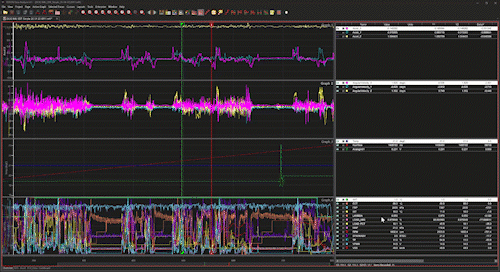
VISION Data Analyzer includes configurable application themes that allow users to tailor the visual environment to their preference or working conditions. Whether analyzing data in a bright lab environment or reviewing long-duration recordings on extended sessions, theme selection helps reduce visual fatigue and improve clarity.
Application themes adjust interface elements such as background tones, graph styling, and overall color presentation while preserving layout structure and functionality.
Select a theme to preview how VDA adapts its workspace.
Extend Analysis with Calculated Channels and APIs
VDA supports advanced post-processing workflows through calculated channels, scripting, and external integration support.
Calculated results can be stored directly inside MDF files and exported alongside recorded channels.
Key Capabilities
-
Formula-based calculated channels
-
C# scripting support
-
Calculated channel export
-
MDF attachment support
-
API support for automation and integration workflows
Share Results Across Teams
VDA helps teams preserve and distribute standardized analysis environments without rebuilding layouts for every recording.
Overlay configurations, layouts, markers, notes, and calculated content can be retained and shared between users.
Key Capabilities
-
Save reusable overlay configurations
-
Preserve layout formatting with exports
-
Share VDAP project files
-
Package projects into ZIP archives
-
Export selected datasets for collaboration
-
Maintain standardized review workflows across teams
Software Ecosystem Integration
Seamless Integration with ATI VISION
VISION Calibration and Data Acquisition Software can export and record directly into MDF4 format. VDA complements this workflow by enabling post-processing and analysis that would be impractical inside a traditional calibration environment.
Together, VISION and VDA provide a streamlined path from acquisition to analysis within a unified ecosystem.


Flexible Subscription Licensing
VDA is a software product that uses a subscription-based licensing model designed to meet the needs of modern engineering teams.
Monthy Subscription
Flexible access with no long-term commitment. Ideal for short-term use or changing project needs.
Annual Subscription
Lower cost option for ongoing use with a 12-month commitment.
Optional VISION Enterprise capabilities will be offered separately as part of the upcoming platform release.
Compatible Hardware


Online purchasing is available in the US, UK, EU, and India. If online purchasing is not available in your location, please contact your regional sales office.
Related Articles


